Build Automated Processes With Power Automate: WSQ Funded

Power Apps Course in Singapore

What Will You Learn in Mastering Power Automate Desktop

  • Create and Manage Automation Flows
  • Verify Approval Automation Flows
  • Support API Data Collection
  • Perform Feasibility Checks
  • Monitor and Troubleshoot
  • Integrate with Microsoft 365
  • Automatically process emails, attachments, and recurring tasks
  • Automate calendar bookings, reminders, and user requests.
  • Connect Power Apps, Sharepoint, SQL, and other enterprise platforms
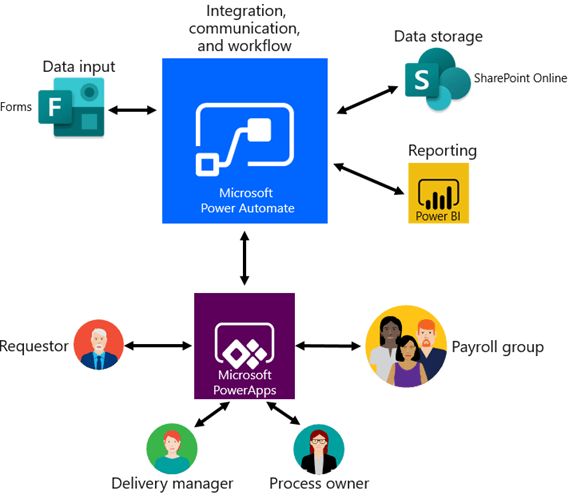
  • Creating Workflows using Microsoft Power Automate 
  • Connecting different solutions to SharePoint Online
  • Calling Automate from external sources
  • Creating workflow triggers and actions with Automate
  • Controlling Automate using conditions
  • Build workflows without coding using Microsoft’s low-code platform
  • Excel to PDF Invoice Email Automation
  • Send Delivery order Emails from Excel

Training Course Fees & Funding

Full course fee: S$1,200.00 (before GST & government funding) TGS: TGS-2026061516

Highest Funding
70% Grant

70% SSG Grant

Baseline + Enhanced Training Support

  • SG Citizens aged 40+ (Individual, SME or MNC)
  • SME-sponsored SG Citizens (21+)
  • SME-sponsored PRs (21+)
Course Fee S$1,200.00
SSG Funding (70%) − S$840.00
Nett Fee S$360.00
GST (9%) S$108.00
You Pay S$468.00
SSG Funded
50% Grant

50% SSG Grant

Baseline WSQ Funding

  • SG Citizens aged 21–39 (Individual or MNC)
  • MNC company-sponsored PRs (21+)
  • Individual PRs (21+)
Course Fee S$1,200.00
SSG Funding (50%) − S$600.00
Nett Fee S$600.00
GST (9%) S$108.00
You Pay S$708.00
Foreigners & other pass holders: Government grants are not applicable. Full course fee of S$1,200.00 + 9% GST = S$1,308.00 applies. Contact us for more details.

Need help with funding applications? We'll guide you through the process.

* Terms & conditions apply. Funding subject to eligibility and approval by respective agencies. GST applies on full course fee before subsidy. Fee information is accurate as of Jul 2026.

Course Overview

The Build Automated Processes with Power Automate course provides learners with the skills to design, implement, and manage automated workflows that integrate various systems and services.

Participants will learn to create flows, manage approvals, and troubleshoot technical issues in application integrations — covering API-level data collection and flow customization for enhanced user-based actions.

Learners gain hands-on experience in feasibility checks, integration tests, and automating tasks across multiple platforms — improving productivity and reducing manual work.

Upon successful completion, participants will be able to:

LO1 Utilize Power Automate to create and manage flows while identifying technical issues in application integration.
LO2 Verify approval flows in Power Automate and identify opportunities for connecting systems and services.
LO3 Support API-level data collection and modify flows for enhanced integration of user-based actions.
LO4 Perform feasibility checks and integration tests for automating tasks across multiple platforms using Power Automate.

Course Outline

LEARNING UNIT 1: Get Started with Power Automate

  • T1: Introducing Power Automate and the low-code ecosystem
  • T2: Utilise Power Automate to integrate data and functions
    • Create your first automated cloud flow
    • Create recurring and scheduled flows
  • T3: Potential technical issues and monitoring
    • Monitor incoming emails and triggers
    • Share flows across your organisation
  • T4: Troubleshoot and debug flows effectively


LEARNING UNIT 2: Build Approval Flows with Power Automate

  • T1: Provide solutions to real-world business scenarios
  • T2: Verify proper functioning of Power Automate
    • Build an Approval Request workflow
    • Create and test a Business Process Flow
  • T3: Conditional branching in Business Process Flows
    • Route approvals based on outcome and urgency
    • Notify stakeholders dynamically in real time


Learning Unit 3: Build Flows to Manage User Information
  • T1: Build a flow that uses API information
    • Work with location data and dynamic date/time
  • T2: Build a flow that accepts user input
    • Support API-level integration with custom inputs
  • T3: Create a flow that blocks time on your calendar
    • Automate calendar management and scheduling workflows


LEARNING UNIT 4: Deep Integration Across Multiple Data Sources

  • T1: Build a flow triggered by a Dynamics 365 event
    • Automate CRM-driven processes end-to-end
  • T2: Build a flow that uses SQL data
    • Connect to databases and automate data operations
  • T3: Integrate Power Apps, Power Automate and SharePoint
    • Monitor flows and manage run history
    • Deploy integrated solutions to end users

Target Audience

  • IT managers and administrators handling business workflows
  • Business analysts integrating systems and services
  • Operations, HR, Finance and cross-functional teams
  • Team leads wanting to reduce manual errors and boost productivity
  • Engineers and executives seeking to automate repetitive tasks
  • Intermediate learners with basic knowledge of automation or workflow tools

Pre-Requisites

Basic familiarity with Microsoft 365 applications. An understanding of workflow concepts or basic automation tools is advantageous.

Grant Information

WSQ: To claim up to 70% WSQ Funding for this Power Automate Desktop MasterClass course, participants must be Singaporeans or PRs. They can be INDIVIDUALS or COMPANY SPONSORED. We will apply for the WSQ Grant on your behalf, AFTER you have successfully registered for this training. SSG Terms and conditions apply for WSQ Funding, based on your/your company’s eligibility.

SkillsFuture for Build Automated Processes with Power Automate Training: Individual Singaporeans aged 25 and above can use their Skills Future Credit (Opening Credit) for this Power Automate training class.

SkillsFuture Credit (Mid-Career) CANNOT be used for this course.

UTAP Funding: NTUC Members can utilize UTAP to offset 50% of the remaining fees*.

Call us at +65 6252 5033 or email info@trainingint.com for any questions or to register for the upcoming class of Microsoft Power Automate Desktop course with SkillsFuture & WSQ funding.

Do You Have Any Questions

on Course Fee, WSQ Grant or Funding?

Ask Us. We’ll be happy to assist you.

Upcoming Course Dates

Training Schedule
30, 31 Jul 2026
1, 2 Oct 2026

How To Register

Register for the 2 Days Mastering Power Automate Course in Singapore today.

Click on the chosen Power Automate Training course dates available at the top of this page.

Need Help in Registering for Microsoft Power Automate Course?

Call us at +65 6252-5033, WhatsApp: +65 9066-9991

Power Automate Corporate Training Program in Singapore (Physical Class or Virtual Classroom using Zoom or Microsoft Teams)

Request a Course Brochure here or enquire about any questions regarding Power Automate training. We offer Corporate Training for your company too.

UTAP: In addition, NTUC members can utilize UTAP to offset 50% of the remaining fees (capped at $250 per year).

If you are looking to train your entire team, we can arrange to conduct the Power Automate training at your office location too. Just contact us for the quotation and suitable dates for the training.

Why Choose Us?

ACTA Certified Trainers

Authorized Training Organization

WSQ
Certifications

Fully Set Up
Training Room

20+ Years
Experience in Education

Practical, Hands-on
Training

25,000+
Certified Students

32+
Courses

Useful & Handy
Student Guide
Contact Us

We are located at Fortune Centre, 190 Middle Road, #10-08 Singapore 188979

Click here for For Directions 

Telephone: 6252-5033  WhatsApp: 9066-9991

Email: info@trainingint.com

Start Saving Today

Get the 8 Tips to Start Saving on Your Website Design
PDF Guide emailed to you now.

Save Money on Website Design Guide