
A great presentation can inspire action, win clients, secure promotions, and influence decisions.
A poor presentation can do exactly the opposite.
Research shows that people form an impression of a speaker within the first few minutes. If your presentation is confusing, overloaded with text, or poorly delivered, your audience may stop listening long before you reach your conclusion.
The truth is:
Most presentations fail not because of bad ideas, but because of poor delivery.
Whether you are:
- Presenting to your management team
- Pitching to customers
- Conducting a training workshop
- Speaking at a conference
- Delivering a sales presentation
Avoiding a few common mistakes can dramatically improve your effectiveness.
In this article, we reveal the 11 most common presentation mistakes and show you exactly how to avoid them.
Why Presentation Skills Matter More Than Ever
Today’s workplace is driven by communication.
People who present well are often seen as:
✔ More competent
✔ More confident
✔ Better leaders
✔ More persuasive
✔ More promotable
No matter how good your ideas are, if you cannot communicate them effectively, those ideas may never gain support.
Presentation skills are no longer optional—they are career skills.
Presentation Mistake #1: Not Using Enough Visuals in The Presentations
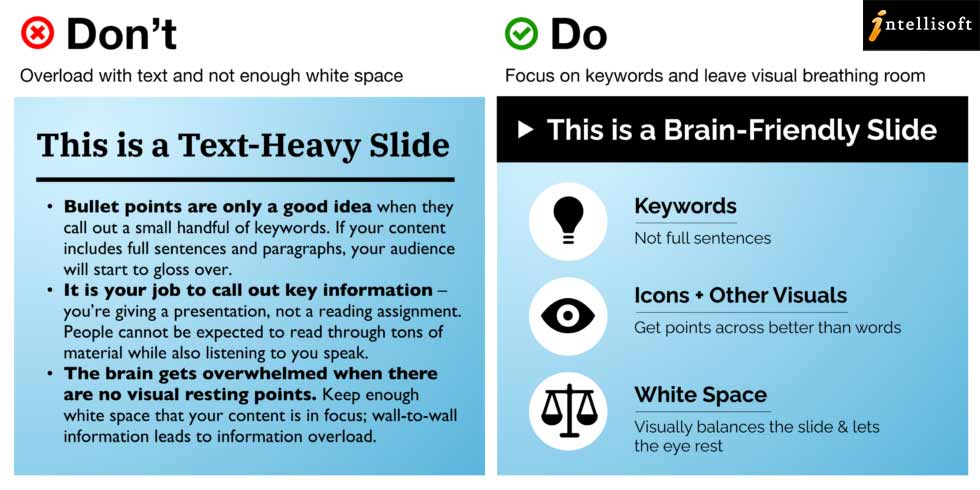
Giving a presentation can be difficult. You want to make sure that your information is conveyed in a way that is easy for your audience to understand, and that they walk away with the right message.
Unfortunately, many presenters focus too much on the words they are saying and not enough on the visuals they are using. This can lead to a presentation that is difficult to follow and leaves the audience with a lot of unanswered questions.
Using visuals in your presentation can be extremely helpful in getting your message across. They can help to illustrate your points, make your presentation more interesting, and help the audience to remember what you have said.
In order to make sure that your visuals are effective, it is important to choose ones that are relevant to your topic, and that support rather than detracts from your message.
According to studies, people remember:
- 10% of what they hear
- 20% of what they read
- Up to 65% of information when it is paired with relevant visuals.
The human brain processes images approximately 60,000 times faster than text.
A slide filled with paragraphs forces the audience to read and listen simultaneously, which creates cognitive overload.
Best Practice:
Instead of this:
Sales increased by 35% due to market expansion.
Show:
- a bar chart
- an infographic
- a before-and-after comparison.
Golden Rule:
One idea per slide.
Presentation Mistake #2: No Engagement With The Audience

In any business situation where you are speaking in front of an audience, engagement is key. It doesn’t matter if you’re giving a speech, presenting at work, or just chatting with clients- if you’re not engaging with your audience, they will lose interest.
This can be a problem for many speakers, as engagement requires energy and enthusiasm.
However, it’s important to remember that even if you’re not feeling it 100%, you can still engage your audience by being genuine and using strong body language.
People do not remember presentations.
They remember experiences.
The fastest way to lose an audience is to turn your presentation into a monologue.
Ways to Engage:
- Ask questions
- Use polls
- Tell stories
- Use demonstrations
- Invite participation
- Ask for a show of hands
- Share personal experiences
The 10-Minute Rule
If nothing changes every 10 minutes, attention starts to drop.
Change something:
- ask a question
- show a video
- tell a story
- switch speakers
- conduct an activity.
Presentation Mistake #3: Not Tailoring Your Presentation to Suit The Audience

When giving a presentation, it’s important to tailor it to your audience.
This means that you should make sure to use language and examples that your audience will understand.
If you don’t do this, your audience may not be able to follow along or may tune out altogether.
In addition, tailoring your presentation also means that you should adjust the length and level of detail based on your audience.
For example, if you’re speaking to a group of experts in your field, you can go into more detail than if you’re speaking to a general audience.
Finally, tailoring also means paying attention to the tone of your presentation. You want to make sure that you are respectful and professional when addressing your audience.
Many presenters prepare one deck and use it for everyone.
This is a huge mistake.
A presentation for:
- Executives
- Engineers
- HR staff
- Customers
should all be different.
Ask Yourself:
- What do they already know?
- Why are they here?
- What problems are they trying to solve?
- What action do I want them to take?
The audience doesn’t care how much you know.
They care about:
“What’s in it for me?”
Presentation Mistake #4: Delivering a Poor Presentation
It is often said that first impressions are lasting impressions. This is certainly true when it comes to presenting oneself in a professional setting.
Poor presentation can ruin an individual’s chances for advancement, regardless of his or her qualifications.
In order to make the best impression possible, it is important to be well-groomed and dressed appropriately for the occasion.
Furthermore, good communication skills are essential for delivering a clear and concise presentation.
You need to know your material well, make eye contact, understand the audience’s needs, and present exactly what they need to take action.
Fortunately, you can improve your delivery by practice. In our Delivering Effective Business Presentations Training Course in Singapore, we give enough practice to our participants so that they can see a real improvement by the time they finish the 2 day’s training.
The 3Vs of Communication
Research by communication expert Albert Mehrabian suggests that emotional communication is influenced by:
- 55% body language
- 38% voice
- 7% words
While these percentages are often misapplied, the principle remains important:
How you say something often matters as much as what you say.
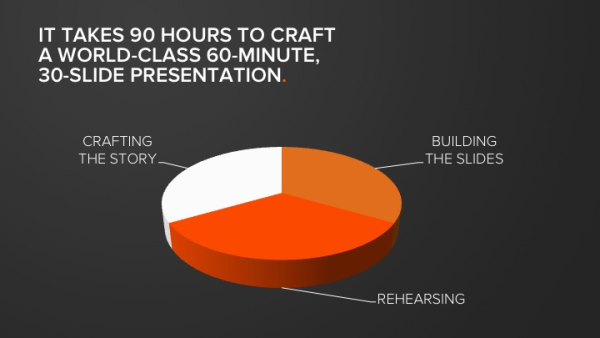
Presentation Mistake #5: Not Rehearsing The Business Presentation Enough Times
Most people would agree that in order to be successful, you must practise your craft. This is especially true when it comes to public speaking.
However, many people do not practise enough and as a result, their presentations are not as good as they could be.
There are a few reasons why people don’t practise enough:
- One reason is that they don’t think they need to.
- They may feel confident in their ability to speak and believe that they will be able to wing it.
- Another reason is that people don’t have enough time.
- They think that they will remember all the points in their head, and being an expert, they can just pull it off easily. But once they face the audience, they get the “butterflies”.
Regardless of the reason, the fact remains that if you want to give a good presentation, you need to practise. And practise often.
Giving a business presentation can be nerve-wracking. You want to make sure you’re well-prepared, but you also don’t want to over-prepare and end up sounding stiff and robotic.
So how do you find the perfect balance between rehearsing & perfection?
One way to rehearse your presentation is to time yourself. This will help you figure out how long your presentation is and where you can cut down on excess talking. It will also help you get a sense of the pacing of your talk.
Another way to rehearse is to practice in front of a friend or family member. They can give you feedback on things like eye contact, posture, and tone of voice.
Finally, make sure to practice your slides. This means timing the transitions between slides, making sure all the text is legible, and adding any relevant animations or videos.
In any field, be it music, athletics or academics, practice is key to success.
The legendary founder of Apple, Steve Jobs is known to rehearse his keynote presentation hundreds of times.
The Rule of Three
Rehearse:
- Alone
- In front of another person
- In the actual room if possible.
Professional speakers often spend several hours preparing for every hour of presentation.
Many TED speakers rehearse for weeks.
Steve Jobs was famous for rehearsing his presentations repeatedly until every transition appeared effortless.
Presentation Mistake #6: Speaking Too Quickly

Many people speak too quickly without realizing it. When you speak too quickly, not only do you make it difficult for others to understand you, but you also lose the impact of your words.
In order to speak more clearly and effectively, practice slowing down your speech. You can also use pauses to emphasize key points.
The average person speaks around 125 words per minute, but when they are trying to get their point across in a business setting they may speak even faster.
In order to ensure that your points are being heard and understood, use visuals in your presentations.
By using visuals you will be able to keep the attention of your audience by providing them with information that is easy to follow and understand.
Presentation Mistake #6.5 – Using Death by PowerPoint
Signs of Death by PowerPoint
- Too many slides
- Too much text
- Tiny fonts
- Complicated diagrams
- Reading directly from slides
- Too many animations
The slides should support the speaker.
They should never become the speaker.
Presentation Mistake #7: Reading From Slides
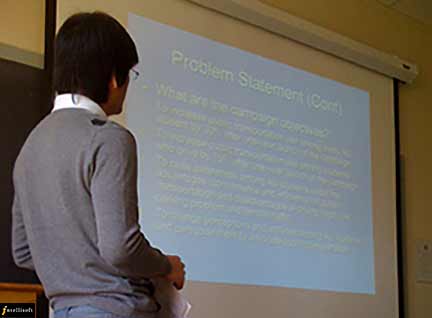
Reading from slides can be an effective way to present information, but it is important to remember that the slides are not the presentation. The slides should be used to support the presenter, not to replace her. When you begin to read the slides from the screen, you effectively lose eye contact with the audience. If all the points are on the slides, then the audience can just read the slides, and you are not adding any value.
So you should not read from the slides, but use the points on the slides to illustrate and elaborate further.
People can read faster than you can speak.
If the entire slide is already on screen, the audience stops listening and starts reading.
At that moment:
You become redundant.
Use the 6×6 Rule
- Maximum six bullet points
- Maximum six words per bullet.
When creating slides, keep these tips handy:
- Use a simple font that is easy to read.
- Limit text to a few words per line, and only 3-4 lines (or bullets) per slide.
- Use bullets or short phrases instead of complete sentences.
- Include images or diagrams whenever possible.
- Avoid using too much colour; stick with one or two colours at most.
Presentation Mistake #8: Adding Too Much Humour in the Presentation

Humour is a powerful tool when used correctly in presentations, but it can also be risky. In some cases, humour may fall flat or offend an audience. If you’re not comfortable using humour or don’t know your audience well, it’s best to leave it out of your presentation.
Instead, focus on delivering clear and concise content. You want your audience to walk away from your presentation feeling informed and inspired, not amused and distracted.
There are a lot of reasons why you might not want to use humour in your presentation. Maybe you don’t think you’re funny. Maybe you’re afraid that something you say will be misinterpreted. Or maybe you just don’t think that humour is an appropriate tool for the occasion.
Whatever the reason, using humour in a presentation can be risky. You need to make sure that your jokes are actually funny, and that they fit with the tone of your presentation. You also need to be careful not to offend your audience or put them offside.
So if you’re not sure whether humour is right for your presentation, it might be best to leave it out.
Humour should be:
- Relevant
- Appropriate
- Natural
- Inclusive
Avoid:
❌ Political jokes
❌ Religious jokes
❌ Offensive humour
❌ Embarrassing someone in the audience
A little humour builds connection.
Too much humour destroys credibility.
Presentation Mistake #9: Having a Poor Body Language while Presenting

When you’re giving a presentation, your body language can either help or hurt your cause. If you have poor body language, it can make you appear less credible and knowledgeable to your audience.
Poor body language can include staring at your notes, picking your nose or tapping your pen on the table.
Conversely, if you have good body language, it can make you appear more confident and credible.
Good body language includes leaning forward and smiling to show that you’re engaged in what you’re saying.
Effective Body Language Checklist
✓ Smile naturally
✓ Maintain eye contact
✓ Stand upright
✓ Move with purpose
✓ Use open gestures
✓ Keep your hands visible
✓ Avoid pacing
✓ Avoid crossing your arms
✓ Avoid looking at the floor
Presentation Mistake #10: Not Ready For Audience Questions
Not preparing for questions that may be asked. Always have a contingency plan in place for questions and answers.
Researching the audience will help you get a feel for what they want to know and what questions are likely to be asked.
As you are making the presentation, always ask them if they are following the presentation, if they have any questions. If you do not want to be interrupted by questions while making the presentation, then announce upfront that you will open the floor for questions towards the end, and that the audience should hold on to the questions till the end.
Add a framework.
The PREP Method for Handling Difficult Questions
P – Pause
Think before answering.
R – Repeat
Restate the question.
E – Explain
Provide your answer.
P – Proceed
Move back to the presentation.
This makes you appear calm and professional.
Add a framework.
Presentation Mistake #11: No Clear Structure To The Presentation

Without a proper structure to the presentation, the speaker tends to go out in different directions, and the presentation does not appear to be focused or coherent. Thus, most often than not, the audience feels lost, and soon loses interest.
Use the Tell-Tell-Tell Method
Tell them what you’re going to tell them.
(Introduction)
Tell them.
(Body)
Tell them what you told them.
(Conclusion)
Simple presentations are memorable presentations.
To keep the presentation engaging, you must follow a clear structure.
In fact, you should introduce the agenda in the beginning. Begin by stating:
- What are you going to cover,
- How much detail you will be going into, and
- What key things do you intend to cover.
Once you begin the presentation,
- Present as per the agenda,
- For Conclusion, summarise the entire presentation, ensure that any loose bits are tied, and
- End the presentation with a flair.
If you can tie the presentation to what you said in the beginning, it is an added bonus and shows a very well thought presentation with a good, clear structure.
Structured presentation go very smoothly, and there is a higher chance that the audience will remember the key points long after.
Not structuring their presentation well can lead to a lack of attention to the audience, rather than them being able to follow your message. If you do not take the time to research the content of your presentation and do not break it down into a short, clear structure, it will not be clear to the audience. This can lead to disappointment and people tend to regard you as a poor speaker.
The Anatomy of a Great Presentation
Every outstanding presentation has five components:
1. A Powerful Opening
Grab attention immediately.
2. A Clear Message
One presentation = one key idea.
3. Compelling Stories
Stories are memorable.
4. Audience Interaction
People learn by participating.
5. A Strong Call to Action
Tell the audience exactly what to do next.
How To Present Your Best Self While Making a Presentation

Here are a few tips to calm you down, improve your self-confidence, and get into the right frame of mind to make a stellar presentation.
- Take a minute to calm down.
- Get comfortable.
- Relax your body.
- Find the best lighting for your presentation.
- Use a whiteboard – It’s easy to forget what you wanted to say if there’s too much noise around you.
- Be confident, but not arrogant.
- Know your presentation.
- Have confidence in your material.
Final Thoughts
People rarely remember every slide.
But they remember:
- How you made them feel.
- Whether you solved their problem.
- Whether you inspired them.
- Whether your message was clear.
A great presentation is not about being perfect.
It is about connecting with your audience, communicating with clarity, and moving people to action.
Master these 11 presentation mistakes and you’ll immediately become a more confident, persuasive and memorable speaker.
Conclusion: How To Prepare Well For a Presentation
Every presentation is unique, so you need to tailor your content accordingly. A great presentation consists of
- A Great Speaker
- Great Content
- A presentation that Appears Smooth, Effortless
- Ends With a Flair
- Is Remembered for a Long Time!
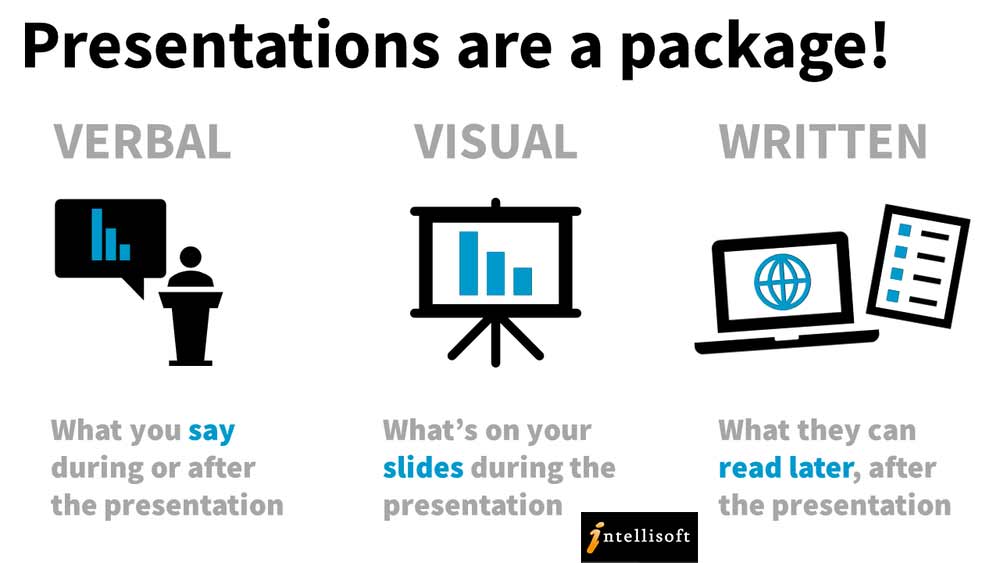
Use These Key Pointers to Wow the Audience & Steal the Show in Your Next Presentation
- Understand the Audience. Find out their need and make sure to present so that they get exactly that.
- Structure the Presentation. Create small sections, and cover them step by step, without missing any point.
- Make sure you have all the materials you need ahead of time, including slides, PowerPoint templates, and visuals.
- Don’t skip over key points – You don’t want your audience to walk away without understanding what you’re trying to say.
- Make sure your content is crisp and clear. If you’re too wordy, focus on the main points.
- Use body language to your advantage – Stand upright, make eye contact, and appear confident, and calm.
- Using the Right Tone – Your personality and the situation will determine your tone. Sometimes you need to be loud and commanding, but sometimes you need to be quiet and persuasive.
- Read the room before you begin the Presentation – If you’re nervous, try to put yourself in your audience’s shoes. Do they want to listen? Are they bored and ready to tune out? What would really interest them? Then begin from there…
- Know how to sell – A presentation is a sales pitch. Make sure to make your case, and show the benefits and salient points of your proposal to them.
- Ask questions, and make sure they understand them.
- Make the Call To Action – Ask the audience to take the required action. Just asking them to take action has a higher percentage of follow through compared to just leaving them with the facts.
Want to Become a More Confident Presenter?
At Intellisoft Training, our presentation skills programmes are highly practical and hands-on.
Participants learn how to:
✔ Structure presentations effectively
✔ Design professional slides
✔ Speak with confidence
✔ Handle difficult questions
✔ Use storytelling techniques
✔ Engage any audience
✔ Deliver persuasive presentations that inspire action.
Whether you’re a manager, trainer, salesperson, engineer, or executive, these skills can dramatically improve your career and professional credibility.
This article is written by Vinai Prakash, the founder of Intellisoft Training.
Intellisoft offers Presentation Skills, and Communication Skills Training with WSQ funding in Singapore.